Five Tips for Swift Package Plugin Development

In this blog post, I'll share five tips to help you develop better Swift Package Plugins and avoid pitfalls.
- Expose a plugin product
- Obtain any executable through artifact bundles
- Adopt for Xcode 14
- Support Arguments for Command plugins
- Support Target Selection
Expose a plugin product
If you develop a reusable plugin that other Swift packages can use, then it is crucial to expose your plugin target through a plugin package product in your Package.swift file!
products: [
    .plugin(name: "SwiftFormat", targets: ["SwiftFormat"]),
],
It is NOT enough to define a plugin target.
targets: [
    .plugin(name: "SwiftFormat",
            capability: .command(
                intent: .sourceCodeFormatting(),
                permissions: [
                    .writeToPackageDirectory(reason: "This command reformats source files"),
                ]
            ),
            dependencies: [.target(name: "swiftformat")]
           ),
]
If you forget this step, then the plugin is only visible within the package in which the plugin was defined. Such a mistake can even happen to Apple 😊
Avoid the hassle of shipping a fix for that mistake.
Obtain any executable through artifact bundles
You might want to leverage an executable in your plugin, e.g. you want to run SwiftFormat in your plugin. Another Swift Package might provide this executable, and you are tempted to declare a package dependency.
dependencies: [
    .package(url: "https://github.com/nicklockwood/SwiftFormat", from: "0.49.11")
],

targets: [
    .plugin(
        name: "SwiftFormatterPlugin",
        // ...
        dependencies: [
            .product(name: "swiftformat", package: "SwiftFormat"),
        ]
    ),
]
Please don't do this.
Letting your plugin build the executable from source is slow, and having a package dependency might cause trouble for consumers if they use the same package dependency with a different version requirement.
Better is to leverage artifact bundles (if such exist) !
targets: [
    .binaryTarget(
        name: "swiftformat",
        url: "https://github.com/nicklockwood/SwiftFormat/releases/download/0.49.12/swiftformat.artifactbundle.zip",
        checksum: "3eb3e7751c1661e45f49386688fdac58741d6563ded2fb830a575d80aad71522"
    ),
    .plugin(
        name: "SwiftFormat",
        // ...
        dependencies: [.target(name: "swiftformat")]
    ),
]
Adopt for Xcode 14
In Xcode 14 (Beta 3) it is possible to
- trigger a command plugin within Xcode
- run a command plugin on an Xcode project
- run a build plugin on an Xcode project
The first point does not necessarily need adoption from you as a plugin author, but I recommend it as the plugin execution can be restricted to specific targets.
Points two and three definitely need adoption from you as a package owner. I wrote about that topic in a previous blog post.
Support Arguments for Command plugins
Arguments can be passed to a Swift Package Command Plugin when
executed from the command-line
 # Example of passing
 swift package plugin --allow-writing-to-package-directory format-source-code --target
 MyLibrary --swiftversion 5.6 --verbose
executed from Xcode
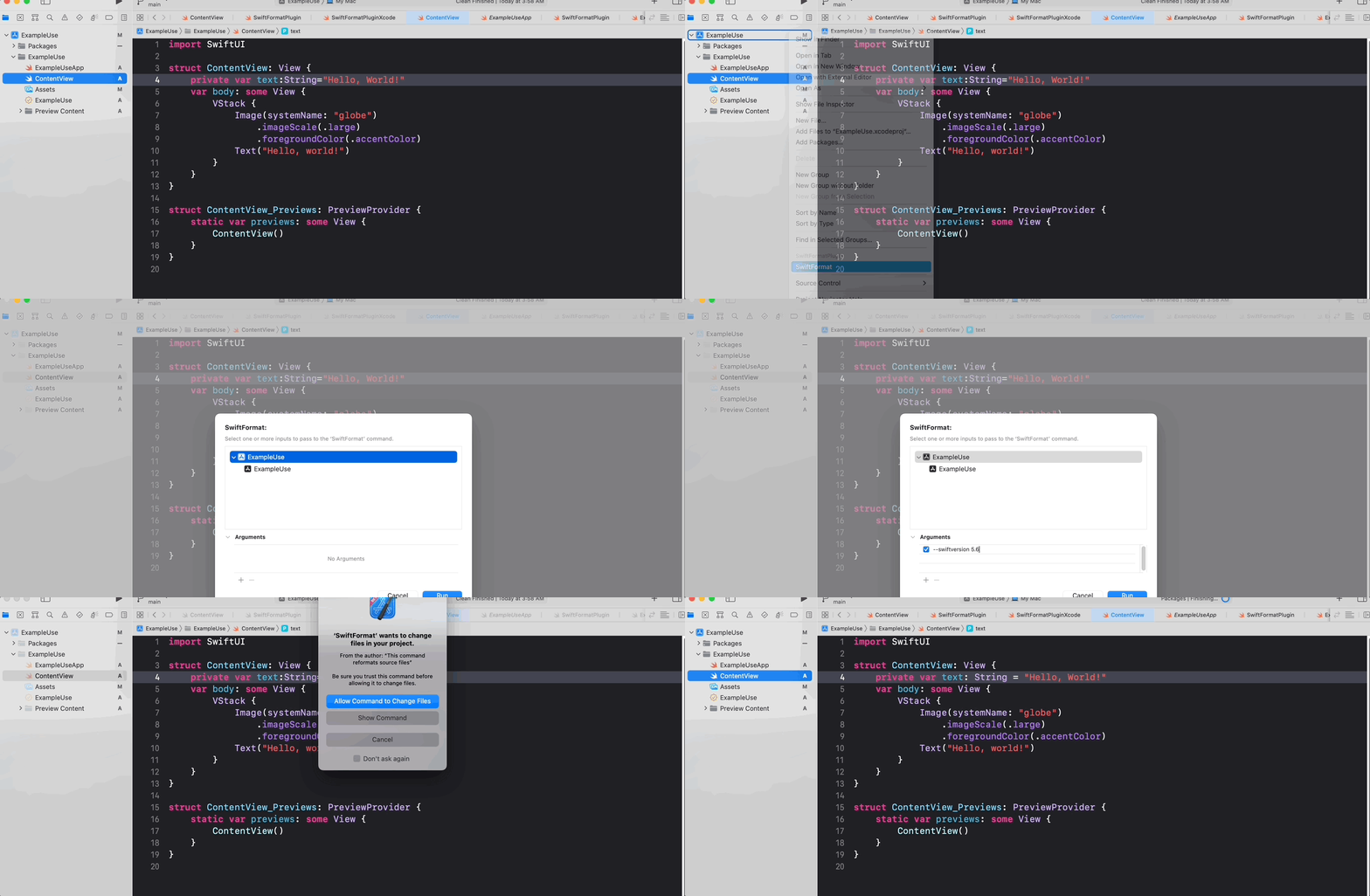
You should read those arguments and handle them accordingly, e.g. passing them to the executable.
To access arguments you can use ArgumentExtractor from PackagePlugin
A rudimentary helper for extracting options and flags from a string list representing command line arguments. The idea is to extract all known options and flags, leaving just the positional arguments. This does not handle well the case in which positional arguments (or option argument values) happen to have the same name as an option or a flag. It only handles the long -- form of options, but it does respect -- as an indication that all remaining arguments are positional.
Example
func performCommand(context: PluginContext, arguments: [String]) throws {
    var argExtractor = ArgumentExtractor(arguments)
    let swiftversion = argExtractor.extractOption(named: "swiftversion")

    // ...
}
Support Target Selection
The execution of a plugin can be restricted to a Target (SPM) or a XcodeTarget. Here is an example of how to extract the target information and process only those targets for a Swift Package Command plugin (operating on a Swift Package).
import Foundation
import PackagePlugin

@main
struct SwiftFormatPlugin: CommandPlugin {
    /// This entry point is called when operating on a Swift package.
    func performCommand(context: PluginContext, arguments: [String]) throws {
        if arguments.contains("--verbose") {
            print("Command plugin execution with arguments \(arguments.description) for Swift package \(context.package.displayName). All target information: \(context.package.targets.description)")
        }

        var targetsToProcess: [Target] = context.package.targets

        var argExtractor = ArgumentExtractor(arguments)

        let selectedTargets = argExtractor.extractOption(named: "target")

        if selectedTargets.isEmpty == false {
            targetsToProcess = context.package.targets.filter { selectedTargets.contains($0.name) }.map { $0 }
        }

        for target in targetsToProcess {
            guard let target = target as? SourceModuleTarget, let directory = URL(string: target.directory.string) else { continue }

            try formatCode(in: directory, context: context, arguments: argExtractor.remainingArguments)
        }
    }
}
You can find the complete source code on GitHub.
About the author
I am a Software Engineer working on open source and enterprise mobile SDKs for iOS and MacOS developers written in Swift. From 🇩🇪 and happily living in 🇺🇸
Comments
Join the discussionNo comments yet. Be the first to comment.