Modify a value during iOS debugging in Xcode

Xcode is using the open-source LLDB debugger and with the expression command you are able to modify a value in a running program.

You can verify that the value has changed with the print command from LLDB.

Once you resume the program you will see that the changed value is still used.
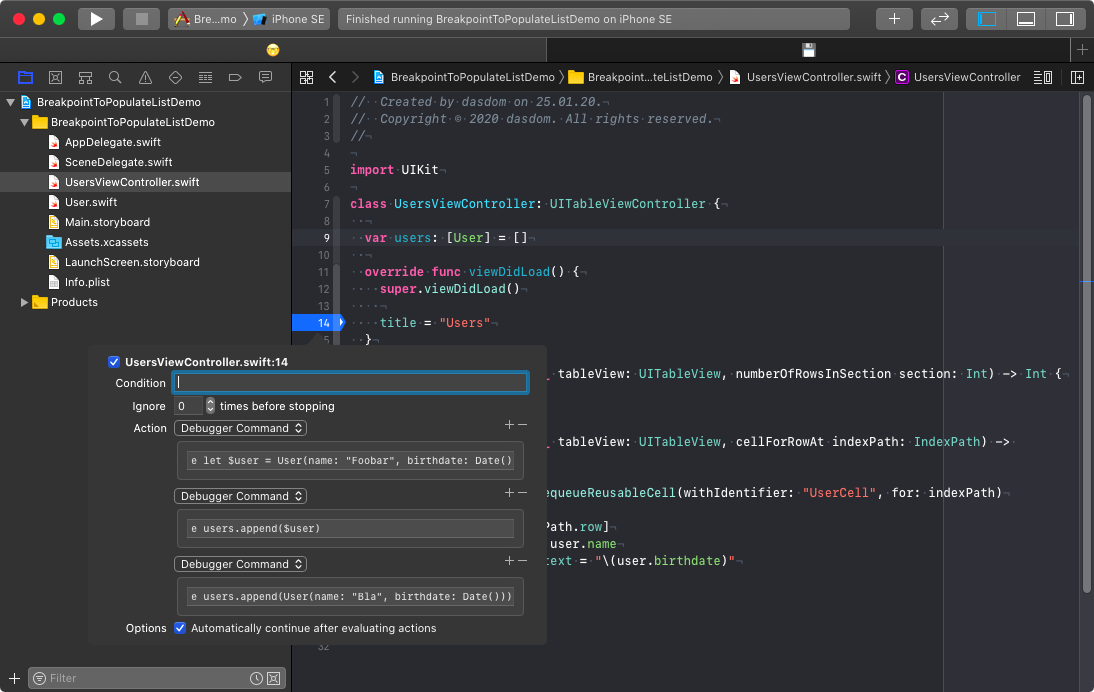
Bonus tip 1: You can also use the abbreviation e as alternative to the verbose expression because LLDB does prefix matching. Same for p as alternative to print.
Bonus tip 2: You can use multiple expressions as actions in the Xcode debugger ti supply test/demo data. Find out more by reading Dominik Hauser's article.
About the author
I am a Software Engineer working on open source and enterprise mobile SDKs for iOS and MacOS developers written in Swift. From 🇩🇪 and happily living in 🇺🇸
Comments
Join the discussionNo comments yet. Be the first to comment.